Live Translation on iPhone 11: Is It Available, and How to Hear Translations in AirPods
Is Live Translation available on iPhone 11, 11 Pro or 11 Pro Max? Why Apple’s feature is missing, what still works, and how to hear translations in your AirPods.
On this page
Your iPhone 11 runs the latest iOS, so it seems fair to expect the latest features. Then you search Settings for Live Translation and find nothing. A lot of iPhone 11 owners land here with the same question: is it hidden, or is it just not there?
It’s not there, and nothing is broken. Apple ties Live Translation to Apple Intelligence, and the oldest iPhones with Apple Intelligence are iPhone 15 Pro and 15 Pro Max. The good news: an iPhone 11 can still translate a conversation, and it can still play the translation in your AirPods.
Short answer: No, Apple’s Live Translation is not available on iPhone 11, 11 Pro or 11 Pro Max. Apple needs an iPhone 15 Pro or later with Apple Intelligence turned on and iOS 26 or later. On an iPhone 11 you can use the Translate app’s Conversation mode on the speaker, or a third-party app that plays live translations in any AirPods or headphones on iOS 18 or later.
Is live translation available on iPhone 11?
Not Apple’s version. Apple’s page on Live Translation with AirPods asks for an “iPhone 15 Pro or later”. The same rule covers Live Translation in Messages, Phone and FaceTime, since all of them run on Apple Intelligence.
The iPhone 11 came out in 2019 with the A13 Bionic chip. It can run iOS 26 and iOS 27, but Apple does not turn on Apple Intelligence for that chip. A reset, a new Apple ID or a region change will not add the feature.
iPhone 11, 11 Pro and 11 Pro Max at a glance
To check your model, open Settings > General > About and read Model Name. All three models get the same answer.
| Model | Chip | Runs iOS 27? | Apple’s Live Translation? |
|---|---|---|---|
| iPhone 11 | A13 Bionic | Yes | No |
| iPhone 11 Pro | A13 Bionic | Yes | No |
| iPhone 11 Pro Max | A13 Bionic | Yes | No |
The Pro models have better cameras, not a different chip, so they are left out too. Our Live Translation on iPhone guide has the full list from iPhone XS to iPhone 18 Pro.
Can AirPods Pro 3 do live translation with iPhone 11?
This search comes up a lot, often right after someone unboxes new AirPods. The answer is no for Apple’s feature. The translation work happens on the iPhone, not inside the AirPods, so new AirPods can’t make up for an iPhone without Apple Intelligence.
| Headphones on iPhone 11 | Apple’s Live Translation | Third-party live translation app |
|---|---|---|
| AirPods Pro 3 or AirPods Pro 2 | No (iPhone not supported) | Yes |
| AirPods 4 with ANC or AirPods 5 | No (iPhone not supported) | Yes |
| AirPods 2, AirPods 3, AirPods 4 without ANC | No (iPhone and AirPods not supported) | Yes |
| AirPods Max or AirPods Max 2 | No | Yes |
| Beats, other Bluetooth or wired headphones | No | Yes |
If you later move to an iPhone 15 Pro or newer, AirPods Pro 2, AirPods Pro 3, AirPods 4 with ANC, AirPods 5 and AirPods Max 2 will run Apple’s feature. See Live Translation on AirPods for each model.
How to get live translation on iPhone 11 today
Apple Intelligence is one way to translate speech, but not the only one. iOS also has on-device Speech and Translation tools that apps can use, and those work on iOS 18 and later without Apple Intelligence. An iPhone 11 qualifies.
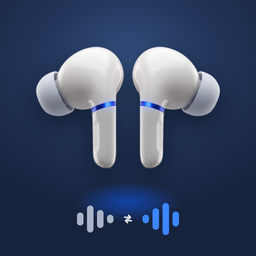
Live Translation on Headphones is built on those tools. You open the Listen tab, pick the two languages, and put the phone near the person talking. About a second after they speak, you hear the translation in your AirPods while they keep going. Each phrase also shows on screen with its translation underneath.
A few details that matter on an older phone:
- Offline after setup. iOS downloads each language once. After that, nothing is uploaded and no account is needed.
- Screen off works. It keeps translating with the iPhone locked, which saves battery on a phone that may not hold a charge like it used to.
- Your reply, out loud. On the Speak tab you say your answer, and the iPhone speaks it in their language through the speaker.
- 14 languages. Any direction, including Turkish, Arabic and Spanish (Mexico), which Apple’s AirPods feature does not offer. Full list on the languages page.
How to use Translate on iPhone 11
Apple’s own Translate app works fine on iPhone 11. It just talks through the speaker instead of your ears, one turn at a time. Here is what you have built in:
| Built-in tool | Works on iPhone 11? | Best for |
|---|---|---|
| Translate app, Conversation | Yes | Short back-and-forth at a counter |
| Translate app, Camera | Yes | Menus, signs, labels |
| Safari page translation | Yes | Websites in another language |
| Live Translation with AirPods | No | Needs Apple Intelligence |
| Live Translation in Messages, Phone, FaceTime | No | Needs Apple Intelligence |
To start a conversation:
- Open Translate and tap Conversation.
- Pick your language and theirs at the top.
- Tap the microphone and speak. The iPhone reads the translation aloud.
- In More Options, turn on Auto Translate so you don’t have to tap before every turn.
Each person has to wait for the other to finish, so it works best for quick questions. Our Translate app guide covers every mode in more detail.
Try it with a few French lines
Before a trip, test any setup at home. Ask a friend to read these, or play a French podcast on a laptop, and see how quickly the English arrives:
- “Excusez-moi, où se trouve la sortie ?” (Excuse me, where is the exit?)
- “Est-ce que le petit-déjeuner est compris ?” (Is breakfast included?)
- “Je voudrais un billet pour Lyon, s’il vous plaît.” (I’d like a ticket to Lyon, please.)
Hold the iPhone about an arm’s length from the speaker and keep its bottom microphone uncovered. Background noise hurts any translator, on any phone.
Is it time to upgrade from iPhone 11?
An iPhone 11 is about seven years old, so some owners are already shopping. If you are, iPhone 15 Pro and newer Pro models, every iPhone 16 and 17 model, and iPhone Air all support Apple’s feature. Skip iPhone 15 and 15 Plus if translation is the reason: they don’t support it. Our iPhone 15 post explains why.
If your iPhone 11 still does what you need, you don’t have to replace it for translation. And a new iPhone won’t give you Turkish, Arabic or Mexican Spanish in your AirPods, since Apple’s AirPods feature doesn’t include them.
The app is made by Little Tough LLC and is not affiliated with Apple. When you do move to a supported iPhone, our Apple Live Translation guide shows how to turn on Apple’s feature.
Quick answers
Does live translation work on iPhone 11? Apple’s Live Translation does not, because it needs Apple Intelligence, which starts with iPhone 15 Pro. The Translate app and third-party translation apps do work on iPhone 11.
Does live translation work on iPhone 11 Pro Max? No. The iPhone 11 Pro Max uses the same A13 Bionic chip as the iPhone 11 and does not support Apple Intelligence.
Can live translate work on iPhone 11 with AirPods Pro 3? Not Apple’s feature, since AirPods Pro 3 need an iPhone 15 Pro or later for it. A third-party app can still play live translations in AirPods Pro 3 on an iPhone 11.
Will live translation come to iPhone 11 in an update? Apple has not said it will. The iPhone 11 runs iOS 27, but Apple Intelligence features stay on iPhone 15 Pro and newer.
Can I use the Translate app on iPhone 11? Yes. Conversation, Camera and text translation all work. It speaks the translation through the iPhone speaker, turn by turn.
Is Apple Live Translation free? Yes. It is built into iOS on supported iPhones and AirPods.
Sources: Apple Support: Use Live Translation with your AirPods, Apple Support: How to get the next generation of Apple Intelligence, Apple: iOS Feature Availability, Apple iPhone User Guide: Translate in-person conversations, App Store: Live Translation on Headphones.